Lab 01 - Build a web application on Azure platform as a service offering
For complete instruction please visit microsoft learn github here we will do the following:
Creating a web application on Azure by using the PaaS model.
Uploading existing web app files by using the Apache Kudu zip deployment option.
Viewing and testing the newly deployed web application.
Lab Scenario
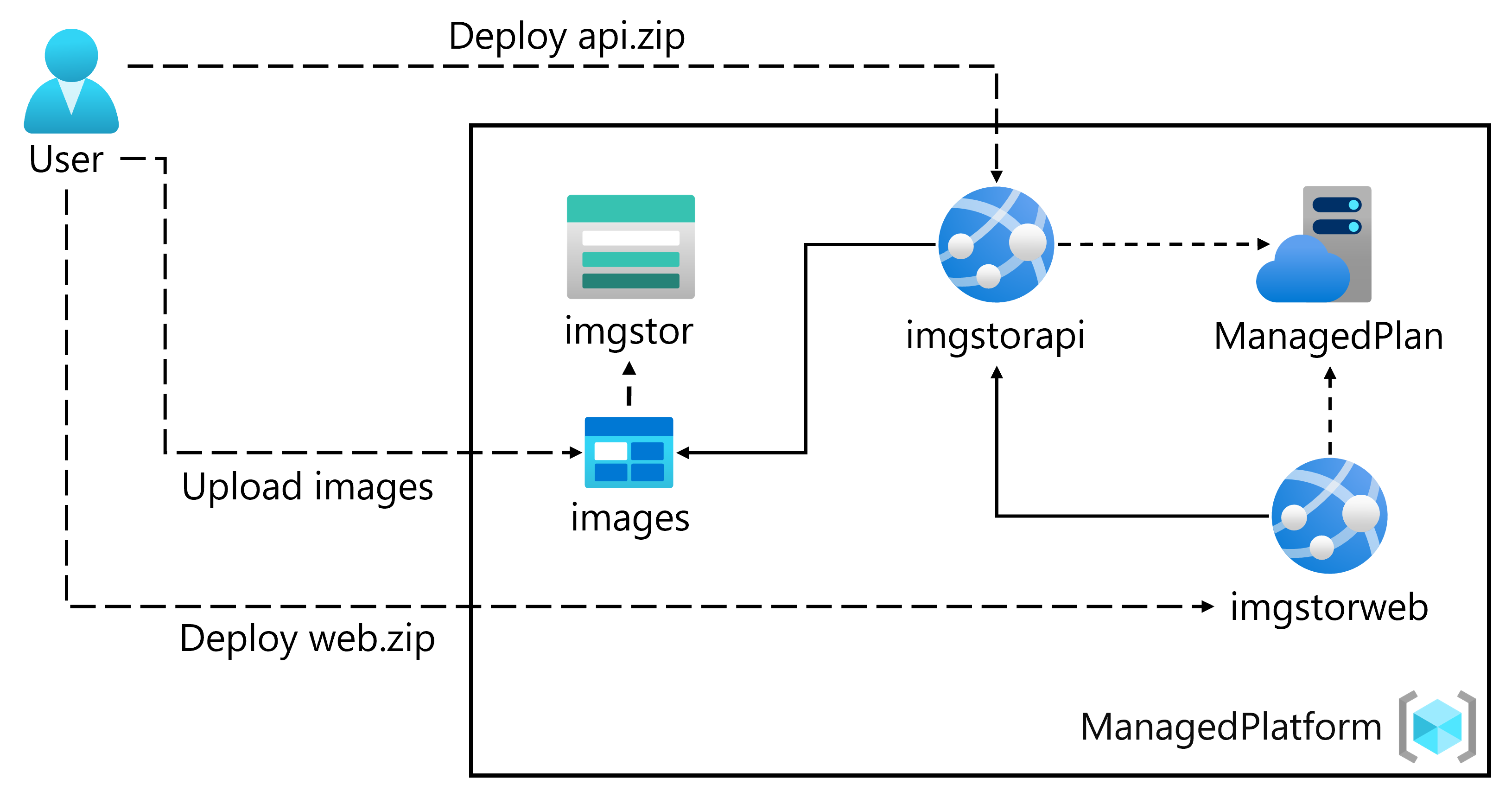
Create a storage account of imgstor50403225 and go to the resource > Access keys > copy a Connection string to Notepad then
Go to the Storage Account > Containers > + Container > name it imagesupload blob
Create a web App (API) of imgapi50403225 with runtime of .net 8 LTS
Configure the web app to storage account using the connection string from notepad
Deploy the API with openning vs code and the folder downloaded from this location: https://github.com/MicrosoftLearning/AZ-204-DevelopingSolutionsforMicrosoftAzure/tree/master/Allfiles/Labs/01/Starter/API
Enter the following CLI command:
az login
az webapp list --resource-group ManagedPlatform-lod50403225 --query "[?starts_with(name, 'imgapi')].{Name:name}" --output tsv
cd C:\Allfiles\Labs\01\Starter\API
az webapp deployment source config-zip --resource-group ManagedPlatform-lod50403225 --src api.zip --name <your-api-name>
- To create Front-End Web App Repeat Web App creation:
Name: imgweb50403225
Use existing plan: ManagedPlan
Same stack/region/OS
Disable Insights, then Review + create > Create.
- To configure Front-End Go to app > Configuration > + New application setting:
Name: ApiUrl
Value: Your previously copied API URL (with https://)
Click Save.
To deploy Front-End, In VS Code > Open Folder: C:\Allfiles\Labs\01\Starter\Web.
In terminal:
az login
az webapp list --resource-group ManagedPlatform-lod50403225 --query "[?starts_with(name, 'imgweb')].{Name:name}" --output tsv
cd C:\Allfiles\Labs\01\Starter\Web
az webapp deployment source config-zip --resource-group ManagedPlatform-lod50403225 --src web.zip --name <your-web-name>
To test the App, Browse to your front-end app, You should see grilledcheese.jpg in the gallery. Upload banhmi.jpg using the UI. Refresh if needed.
About the authors
I’m Amir Rouhanipoor, an IT Consultant specializing in Azure and cloud solutions. I help organizations streamline their IT and drive growth through secure, efficient cloud technologies.
Security-focused Cloud & Automation Engineer with a Master’s in Computer Science and 6+ years of experience automating and supporting enterprise IT environments across multi-site corporate and operational infrastructures. Proficient in Python scripting, Azure infrastructure, Windows Server, and identity management. Skilled in integrating third-party platforms, securing configurations, and streamlining operations. Currently pursuing the Cybersecurity Architect Expert certification with a strong focus on cloud security and automation.
Comments
Join the discussionNo comments yet. Be the first to comment.